What Is Faceless Video Creation? A Complete Beginner’s Guide | GetShorts.ai
Why Do Creators Choose Faceless Content?
How Creators Use Faceless Videos on YouTube, TikTok, and in Ads?
How GetShorts.AI Helps You Create Faceless Videos?
Pick A Video Style And Visuals
Final Thoughts - Try GetShorts.AI To Start Creating Your First Faceless Video
Ques1. Why Are Faceless Videos Becoming So Popular?
Ques2. Can GetShorts.AI Help Me Grow My Social Media Presence?
Ques3. How Much Time Does It Take To Create A Faceless Video Using GetShorts.AI?
Ques4. Can I Customize My Videos Made With GetShorts.AI?
Ques5. What Makes GetShorts.AI Different From Other Video Tools?
Creating faceless videos involves making videos without showing your face, utilising elements such as clips, animations, voiceovers, or text. The idea of making faceless videos is perfect for those who want to confidently share their ideas without appearing on camera.
Many creators prefer this style because it's simple, creative, and allows them to stay consistent with their work while maintaining their privacy. Whether it's for YouTube, TikTok, or Instagram, it's a great way to tell stories and grow your online presence.
Why Do Creators Choose Faceless Content?
Creators choose to make faceless videos because it gives them the freedom to focus on ideas, storytelling, and creativity rather than their appearance. Many people have great ideas to share, but feel uncomfortable facing the camera, and faceless videos completely solve this problem.
For example, a creator who loves talking about tech tools or business tips can use visuals, voiceovers, and animation to connect with their audience without ever showing their face.
People often choose faceless video production because it saves time, reduces pressure, and helps maintain privacy. Additionally, faceless videos are easier to scale and repurpose on platforms like YouTube or TikTok. Ultimately, viewers connect more with authenticity and value than with faces, that is, with the story behind the screen.
How Creators Use Faceless Videos on YouTube, TikTok, and in Ads?
There are numerous ways for creators to use faceless videos on YouTube, TikTok & Ads.
On YouTube - Creators use voiceovers, motion graphics, and stock footage to explain ideas in their own way, tell stories, or share tutorials, allowing them to convey information clearly and engagingly. This approach helps them focus entirely on delivering value and creativity without worrying about the look or setup. From scrip to upload you can do anything easily with this amazing tool.
Whether it's an educational video, a product review, or a motivational story, faceless content helps creators build trust, showcase their expertise, and attract viewers who are more interested in the knowledge and storytelling than in who is behind the camera.
On TikTok - Short, engaging clips with captions, trending sounds, and simple visuals make content easy to watch, understand, and share instantly. On platforms like TikTok, this style grabs attention in just a few seconds and keeps viewers engaged until the very end, which increases their chances of going viral and easily reaching new audiences.
Ads - Brands prefer to use faceless videos so that viewers only focus on the products, stories, and core messages rather than a presenter. This undistracted approach gives their content a lean, relatable, and professional look that feels authentic and easy to trust.
How GetShorts.AI Helps You Create Faceless Videos?
Now we are going to talk about the hero part, which is Getshorts.ai. I told you everything about what faceless videos are, how to use them, and when to use them, but now the question arises: how can you make faceless videos?
With the help of Getshorts.ai, you can make your faceless videos on any topic. It makes your videos simple, fast, and exciting, even if you've never edited a video before. GetShorts.ai makes it easy. Instead of spending hours finding clips, writing scripts, or recording voiceovers, Getshorts.ai does it all for you in just a few clicks. It automatically creates engaging videos from your text, blog post, or idea using AI-powered visuals, voiceovers, and captions.
Look here for general steps:-
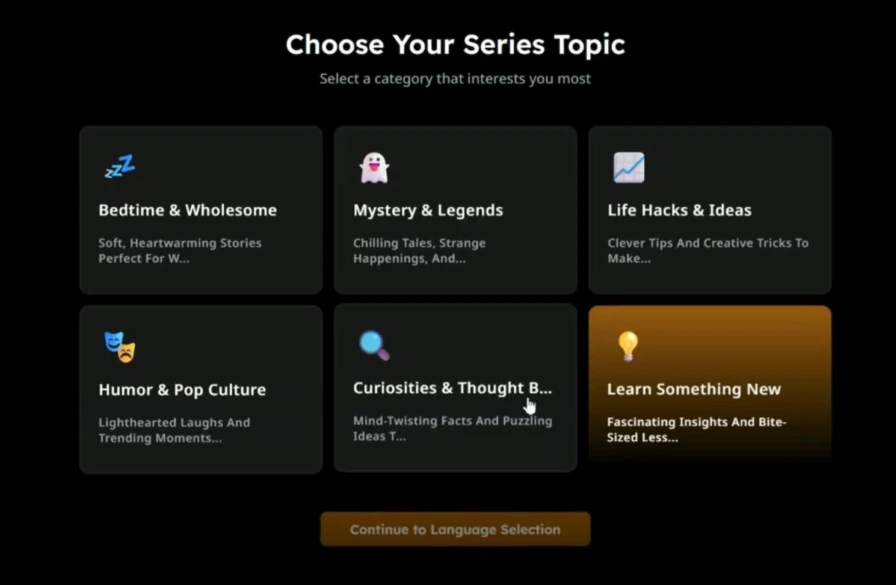
Choose A Topic And Script It
First, choose a topic you're passionate about or one that your audience will enjoy, something you're excited to share. Then, write a short and easy-to-understand script that clearly conveys your idea or story. Keep your message simple, engaging, and focused so viewers can connect with it immediately.
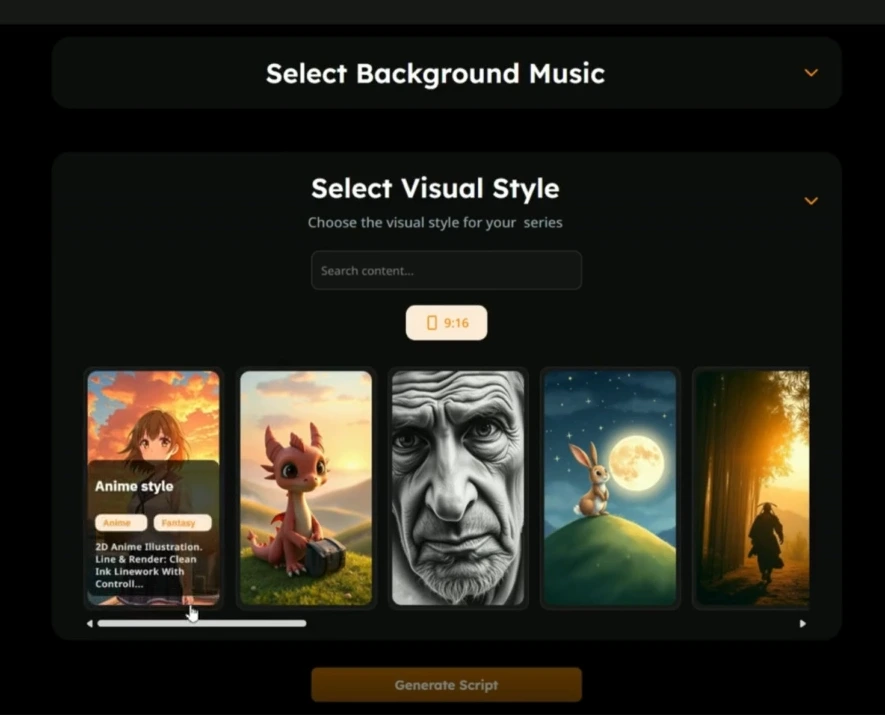
Pick A Video Style And Visuals
Choose visuals that match your message and tone to define the overall look and feel of your video. You can use clips, animations, stock footage, or simple motion graphics to make your content even more engaging. The right visuals help your story stand out, keep viewers captivated, and make your message easier to understand.
Add AI Voiceover & Captions
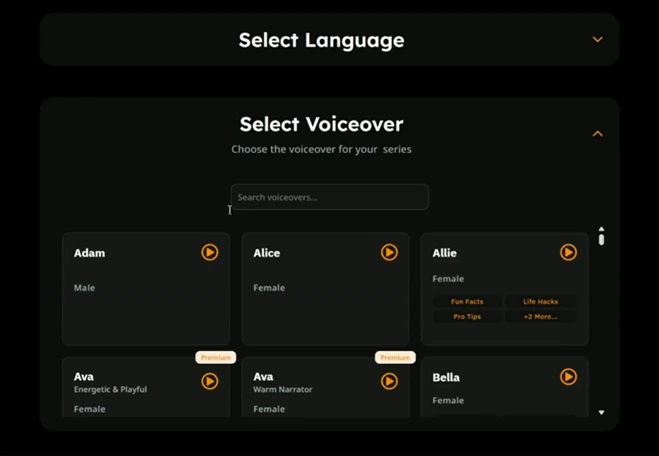
In Getshorts.ai, you can try different voices, accents, and styles to match your brand or message. Along with that, AI automatically adds accurate captions, making your video more accessible, engaging, and professional, so viewers can enjoy it even without sound.
Edit And Finalize
Before finalizing your video, take a moment to check everything. Since GetShorts automatically handles scripting, visuals, captions, and editing, you don't need to trim clips or rearrange anything manually. Instead, you can make small changes like changing the voice, editing the script, changing the background visuals, or updating the text style.
Once you're happy with the preview, simply download it or publish it directly to your platform. These quick improvements ensure your video looks clean, professional, and in line with your brand without any complicated editing.
For best video styles you will love to know about 10 faceless video styles with getshorts that saves your hours and chances are high for viral.
Final Thoughts - Try GetShorts.AI To Start Creating Your First Faceless Video
Are you ready to create your first faceless video? Getshorts.ai is here to help you create amazing videos. With this incredible tool, you can build your channel and grow rapidly. Creating a faceless video channel with Getshorts.ai can be a great income option for anyone, and the best part is, you're your own boss.
Then, why are you waiting for?
Sign up today and take the first step towards creating an easy and successful faceless video channel. Use Getshorts.ai to brighten your future, save your hours in content creation and turn your dreams into reality.
FAQ
Ques1. Why Are Faceless Videos Becoming So Popular?
Ans - It is great for those people who are shy or don't want to face the camera, that’s why it's popular, because anyone can make faceless videos and show their talent.
Ques2. Can GetShorts.AI Help Me Grow My Social Media Presence?
Ans - Yes, of course, if you use this tool wisely and consistently, you can definitely grow your social media presence.
Ques3. How Much Time Does It Take To Create A Faceless Video Using GetShorts.AI?
Ans - It depends on the video type, but the general time is 2-5 minutes to create a faceless video.
Ques4. Can I Customize My Videos Made With GetShorts.AI?
Ans - Definitely. Getshorts.ai gives you the option to choose your video style, voiceover tone, and visuals. You can adjust captions, background clips, and pacing to match your personal or brand style easily.
Ques5. What Makes GetShorts.AI Different From Other Video Tools?
Ans - Getshorts.ai is specifically designed for creating faceless videos. It combines AI-driven scripting, visuals, and voiceovers all in one place, helping you easily and consistently create professional, platform-ready videos while saving you hours.


