How To Use GetShorts.AI For Faceless Video Creation?
How To Use GetShorts.AI For Faceless Video Creation?
Give The Job To Write Your Script
Choose Voice & Style As Per Your Content
Generate Your Video In Minutes
Common Mistakes That You Should Avoid
Final Thoughts – Master Faceless Video Creation With Getshorts
Ques1. Do I Need Video Editing Skills To Use Getshorts.AI?
Ques2. Can I Customize the AI-Generated Script In Getshorts.AI?
Ques3. Does Getshorts.AI Support Posting Directly To Social Media Platforms?
Ques4. Can I Choose Different Voices And Styles For My Videos In Getshorts.AI?
If you’ve ever dreamed of growing on social media like YouTube, TikTok, or Instagram without showing your face, GetShorts.ai makes that dream a reality.
With GetShorts, you don't need a camera, editing skills, or hours of work; you just need a good idea. AI works on your topic, writes a compelling script for you, adds a realistic voiceover, selects visuals and music that match your vibe, and delivers a faceless short video ready to publish in just minutes, making your job incredibly easy.
Furthermore, everything you create is entirely yours, with no watermarks and no hidden limitations. You'll have complete control, HD output, and smart features like auto-captions, video styles, and one-click scheduling for social media.
How To Use GetShorts.AI For Faceless Video Creation?
Creating a professional faceless video has always been a challenging task because you have to perform multiple tasks with different tools, but with GetShorts.ai, it's stress-free and time-saving. In just a few clicks, you can transform a simple idea into a short video ready to be posted: no camera, no microphone, no editing stress!
I guide you step by step on using Getshorts.ai for faceless video creation.
Start With Your Idea
Simply type in your topic or niche; it can be anything, such as motivational quotes, tech facts, fun stories, fashion content, or business tips. GetShorts quickly understands your idea and turns it into a video as you want. No need to overthink, just share your topic and let the AI do the rest!
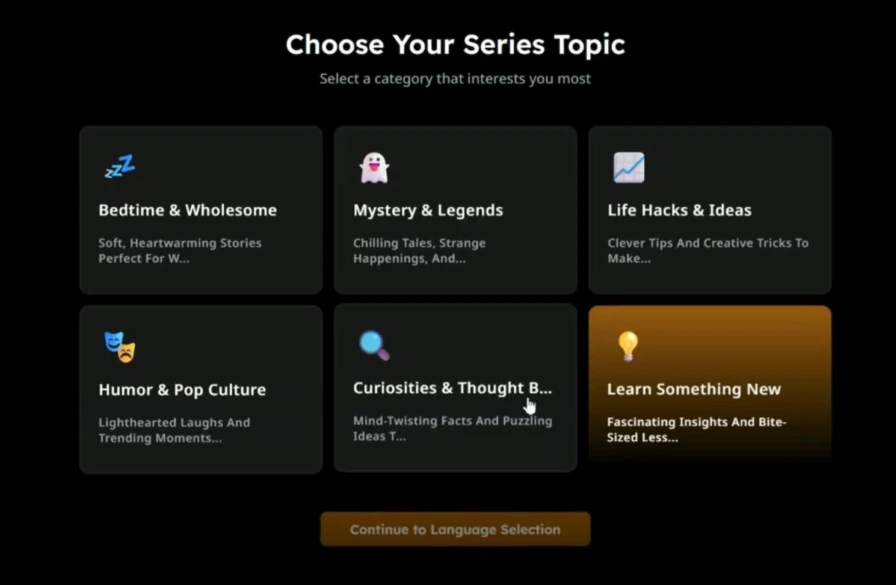
Give The Job To Write Your Script
After you provide Getshorts.ai with an idea, it instantly writes a short and engaging script that grabs viewers' attention and keeps them hooked until the end. You can edit or adjust the lines if you want, but most users find the script so natural and well-written that it's ready to use immediately! Scripting is a crucial part of video creation, and this tool does an excellent job of it.
Choose Voice & Style As Per Your Content
Choose a voice that matches the mood of your video, whether it's calm, energetic, funny, male, female, or even your own cloned voice. GetShorts automatically adds background music, which you can change to suit your content, and captions that are perfectly synced with the visuals.
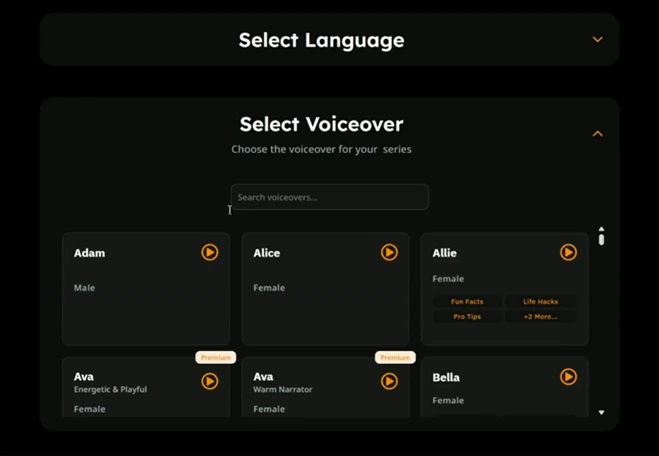
You don't need any editing skills because the AI does everything for you, transforming your faceless video into a professional-sounding and looking video in just minutes!
Generate Your Video In Minutes
As soon as you hit the "Create" button, the real magic begins! Getshorts.ai instantly combines your visuals, voiceover, subtitles, and smooth transitions automatically. In just a few minutes, you get a fully edited, professional-looking faceless video that's ready to post. No complicated software, no stress, just fast and easy creation!
Download & Publish
Once your video is ready, you can download it instantly or schedule it to be posted directly to YouTube Shorts, TikTok, Instagram Reels, or wherever you like. GetShorts also helps you stay consistent by managing your posting schedule, ensuring your content reaches your audience even when you're busy!
Hope you will understand better about how to create faceless videos with Getshorts.ai, but still, if you have any doubts, you can ask through comments. Try to create different looking videos which helps to gain more views and you can do this with getshorts.
Common Mistakes That You Should Avoid
When creating faceless videos with AI tools like GetShorts, it's easy to make small mistakes that can affect the quality and reach of your videos. Here are some things you should keep in mind.
Using Irrelevant Visuals
Always use visuals that match your script or message. If you include random or irrelevant clips, your viewers may get confused and lose interest. It can also make your video look unprofessional, so don't take the risk. Choose visuals that are clearly related to what you're saying; this makes your content easier to understand and more engaging to watch.
Overloading Videos With Too Much Text
Avoid putting too much text on the screen, as this can make your video look cluttered and difficult to understand. If viewers have to read too much, they may lose focus, making the content less engaging. Keep your captions short, simple, and easy to read. Let your visuals and voiceover convey the main message, while the text only highlights the most important points for better engagement and clarity.
Ignoring Pacing Or AI Voice Adjustments
Rhythm is crucial in a video! If your pacing is too fast or too slow, people might lose interest. Also, choose your voice tone according to your topic, such as a calm tone for educational content and an energetic tone for entertainment. Adjusting your pacing and voice can make your video more engaging and natural.
Final Thoughts – Master Faceless Video Creation With Getshorts
If you truly want to save time, create clean and professional videos, and effortlessly boost your online presence, then Getshorts.ai is an essential tool. It eliminates all the stress of scripting, editing, and designing, and delivers stunning faceless videos in just minutes.
Whether you're a content creator, marketer, or complete beginner, GetShorts.ai helps you stand out with high-quality, engaging videos. Stop wasting hours on manual editing; let AI handle the hard work while you focus on easily creating, sharing, and growing your audience!
Try our Getshorts.ai today to make your career the best. If you want, you can watch the Getshorts.ai faceless video creation tutorial on our website to become familiar with this tool.
FAQ
Ques1. Do I Need Video Editing Skills To Use Getshorts.AI?
Ans - No, you don’t need any editing skills to use Getshorts.ai.
Ques2. Can I Customize the AI-Generated Script In Getshorts.AI?
Ans - Yes, you can easily customize the AI-generated script in this tool.
Ques3. Does Getshorts.AI Support Posting Directly To Social Media Platforms?
Ans - Yes, it is.
Ques4. Can I Choose Different Voices And Styles For My Videos In Getshorts.AI?
Ans - Yes, you can use many different types of voices and styles for your video in GetShorts.ai.


