InVideo vs Synthesia: The Honest Comparison Nobody's Doing
Table of Contents
Choosing the right AI video generator is one of the most important decisions you'll make for your marketing team or content channel. The market is saturated with options, but two names consistently stand out in searches: InVideo and Synthesia. However, when you perform an invideo vs synthesia analysis, you'll quickly realize that these platforms target entirely different workflows, budgets, and end goals.
In this guide, we're going beyond the generic marketing sheets to provide an honest, hands-on ai video editor comparison. We'll examine avatar realism, scripting capabilities, editing workflows, pricing models, and where tools like GetShorts fit into the equation to help you decide which platform is the best investment for your business.
The Core Philosophy: Template-Based Editing vs. AI Avatar Studio#
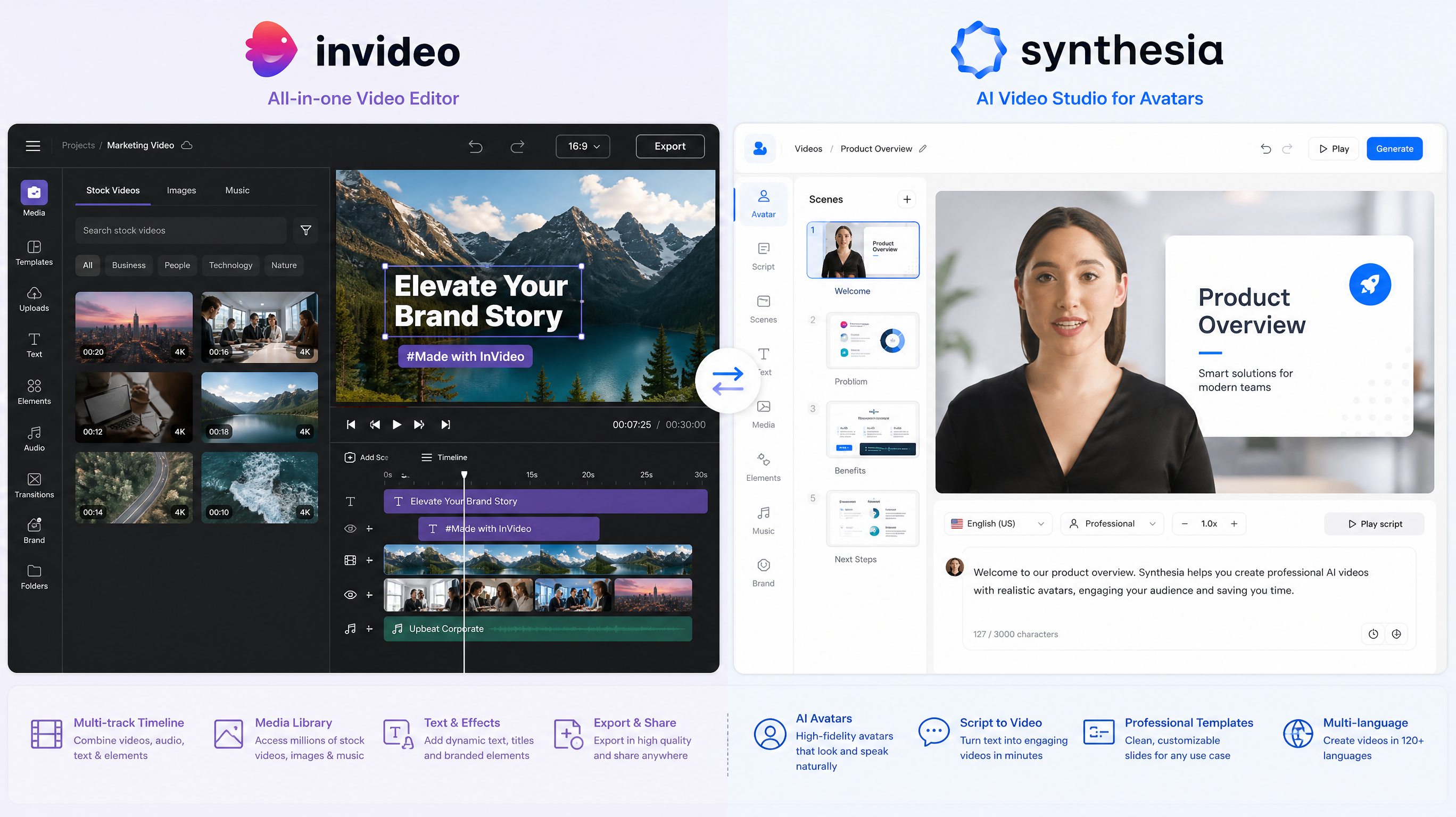
The primary difference between InVideo and Synthesia lies in what they were built to do. InVideo (specifically InVideo AI) is designed as a prompt-to-video tool that compiles stock footage, templates, and synthetic voiceovers. It has a template-first architecture which is highly effective for quick social media videos but lacks advanced, customized talking-head avatars for high-fidelity brand marketing.
Synthesia, on the other hand, is a dedicated talking-head avatar studio. It was built from the ground up for corporate training, onboarding videos, and educational content. Its main feature is its selection of highly realistic, lifelike AI avatars that read scripts with professional lip-syncing. It is not an editor for stock clips or complex social media layouts; it is a digital presenter platform.
InVideo: Features, Pros, and Cons#
InVideo's primary strength is its speed. By entering a prompt like "create a YouTube short about real estate trends," the AI generates a script, selects matching background clips, adds basic text animations, and overlays a voiceover. While useful for churn-and-burn content, it heavily relies on older templates. This means videos can look repetitive, and customizing elements requires digging into traditional timeline layouts.
InVideo AI Pros
- •Incredibly fast prompt-to-video generation for social media
- •Large library of stock footage and background tracks
- •Good voiceover generation with multiple accents
- •Timeline and script editor allow direct text-based modifications
InVideo AI Cons
- •Template-based outputs can look generic and unoriginal
- •Lacks realistic AI avatars for custom UGC or spokesperson videos
- •Subscription costs can add up if you require high volume
- •Not fully AI-native for custom visual asset creation
Synthesia: Features, Pros, and Cons#
Synthesia is the market leader for corporate training presentations. If you need to turn a 10-page training manual into a series of professional videos, Synthesia is built for this. You choose an avatar, paste your script, and the system outputs a clean, slides-style presentation. However, its pricing is steep, and it is poorly optimized for social-first vertical video ads or faceless viral channels.
Synthesia Pros
- •High-fidelity Talking-Head AI avatars with excellent lip-syncing
- •Great selection of corporate templates and professional presentation layouts
- •Supports over 120 languages and high-quality voice synthesis
- •Allows custom avatar creation (for an additional enterprise fee)
Synthesia Cons
- •Very expensive, with strict usage limits on entry plans
- •No natural stock-media montage creator or automated B-roll synthesis
- •Clunky vertical video creator; not optimized for TikTok or Reels layouts
- •No built-in voice cloning or custom voiceovers for lower tiers
Ready to generate scroll-stopping video ads?
Access organic AI UGC avatars and text-to-speech in minutes.
Try GetShorts — The Best of Both WorldsHead-to-Head Comparison: Features and Pricing#
When analyzing synthesia vs invideo side-by-side, we must evaluate how they perform across key marketing metrics. If your priority is building a faceless YouTube or TikTok channel, InVideo’s automated stock compilation is helpful, but we highly recommend a specialized faceless video generator. If your goal is human spokesperson ads, Synthesia's avatars win, but they come at a prohibitive corporate cost.
| Feature / Metric | InVideo AI | Synthesia | GetShorts |
|---|---|---|---|
| Primary Use Case | Social Stock Video Montages | Corporate Training Slides | AI UGC Ads & Story Videos |
| AI Avatars | Basic / No custom avatars | Excellent (140+ premium actors) | Realistic UGC Avatars & Twin Cloning |
| Voice Cloning | Available (limited controls) | Enterprise plans only | ElevenLabs integration standard |
| Social Automation | Manual scheduling only | None (no publishing tools) | Full Series Automation (Auto-posting) |
| Starting Price | $25/mo (yearly) / $30/mo | $22/mo (10 min video limit) | $29/mo (Includes UGC & Stories) |
| Free Options | Watermarked free trial | No free tier / demo only | Free trials + Free TTS tools |
Why Marketers are Choosing GetShorts Instead#
While InVideo and Synthesia are great for their specific niches, they leave a massive gap for digital marketers, e-commerce brands, and independent content creators. This is where GetShorts shines. It provides the hyper-realistic talking-head avatars of Synthesia with the fast, automated workflows of InVideo—all optimized specifically for conversion-driven social channels.
With GetShorts, you can use our AI UGC generator to create authentic social media ads using lifelike avatars in minutes. You don't need corporate budgets to access premium lip-syncing or AI voice cloning. Furthermore, our system features direct social media integrations, meaning you can configure automated video posting campaigns that keep your TikTok, Reels, and YouTube channels active on autopilot.
Conclusion: Which Tool is Right for You?#
The choice between InVideo, Synthesia, and GetShorts depends on your specific requirements:
Choose InVideo if you want to quickly compile stock footage montages with basic voiceovers and don't need talking-head human avatars. Choose Synthesia if you are a corporate L&D department needing professional slide-based training presentations and have a flexible budget. Choose GetShorts if you are a marketer, creator, or agency wanting to build high-converting UGC ads, clone your face or voice, and automate your short-form social media consistency.
Stop Booking Overpriced Creators. Start Scaling UGC Ads.
Produce high-quality AI avatars, auto-captions, B-roll composites and translate scripts instantly. Generate 10+ hook variants for testing.
No credit card required • Start free trial instantly