How to Create High-Converting TikTok Shop Video Ads With AI
Table of Contents
TikTok Shop has completely rewritten the playbook for direct-to-consumer e-commerce. Instead of forcing shoppers through multi-step funnels, off-platform landing pages, and sluggish mobile checkouts, TikTok allows viewers to purchase products directly from their For You feed with a single tap on the yellow shopping basket. But knowing how to create tiktok shop video ads that convert cold scrollers into immediate buyers requires a fundamentally different creative strategy than running conventional paid social ads.
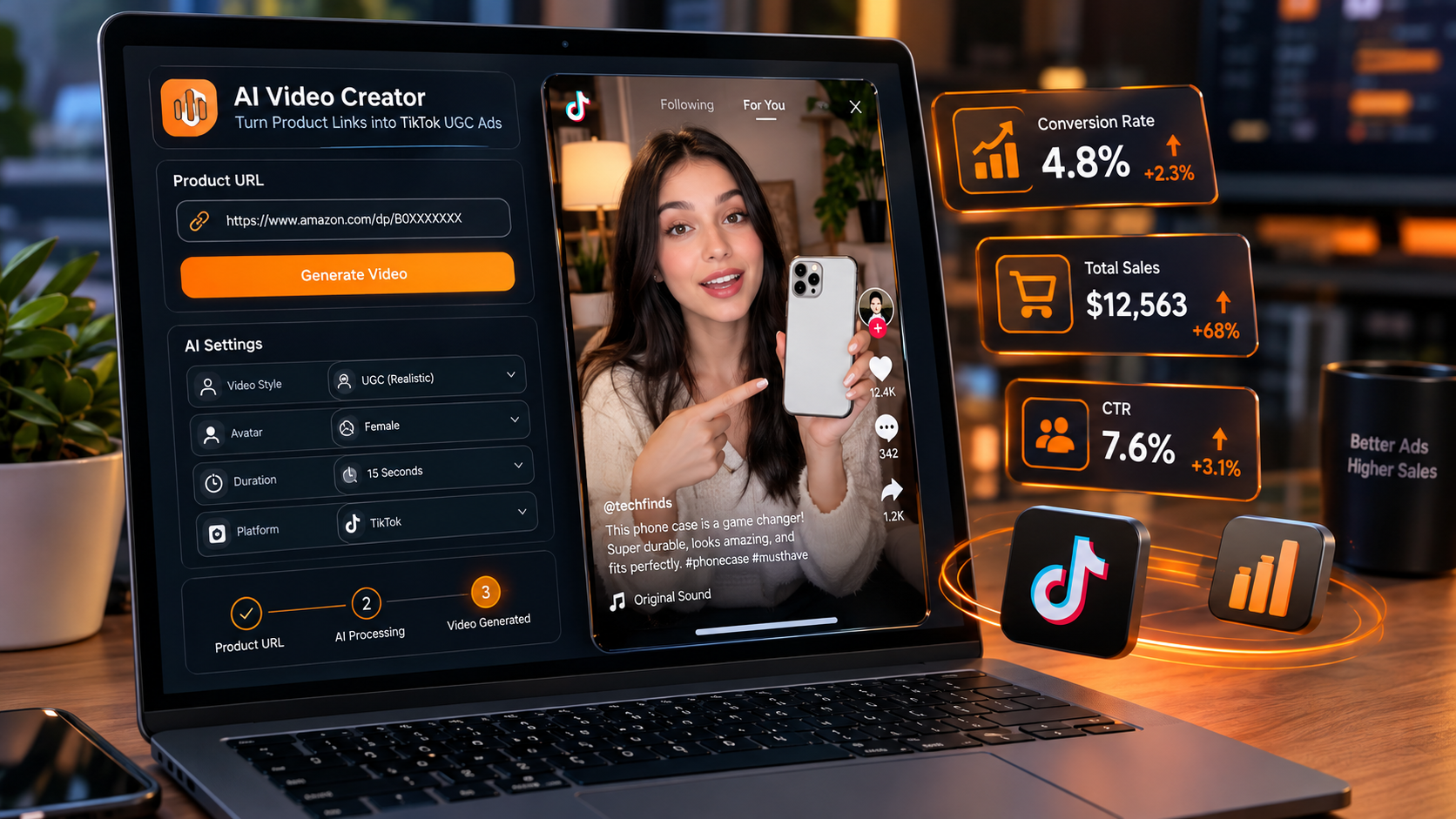
Slick studio commercials consistently flop on TikTok Shop because users immediately recognize them as promotional pitches and swipe away within 1.5 seconds. The ads that consistently clear 5-figure daily GMV look like spontaneous, unfiltered user-generated content (UGC). By utilizing an AI UGC generator like GetShorts, e-commerce brands and affiliate creators can produce dozens of high-converting, native-feeling video creatives in minutes without spending thousands on creator seeding or endless studio edits.
The Anatomy of a High-Converting TikTok Shop Video Ad#
Before generating a single asset, you must understand the four creative pillars that trigger the TikTok Shop recommendation engine and convince viewers to buy immediately:
1. The 3-Second Sensory Hook: TikTok Shop buyers are impulsive. Your video must disrupt their scrolling trance through sudden motion, a dramatic visual demonstration, or an intense curiosity statement that highlights a tangible pain point.
2. Immediate Native Demonstration: Viewers demand proof that the product solves an annoying frustration. Show the problem first, then reveal the transformation within the initial 7 seconds.
3. Relatable Social Proof: Whether addressing skepticism or sharing an authentic reaction, the speaker must feel like an everyday consumer rather than a hired spokesperson reading a corporate brief.
4. The Frictionless Call-to-Action: Remind the viewer explicitly where to look: pointing directly down toward the bottom-left corner of the screen where the TikTok Shop yellow shopping tag appears.
Ready to generate scroll-stopping video ads?
Access organic AI UGC avatars and text-to-speech in minutes.
Generate Your First TikTok Shop Ad Free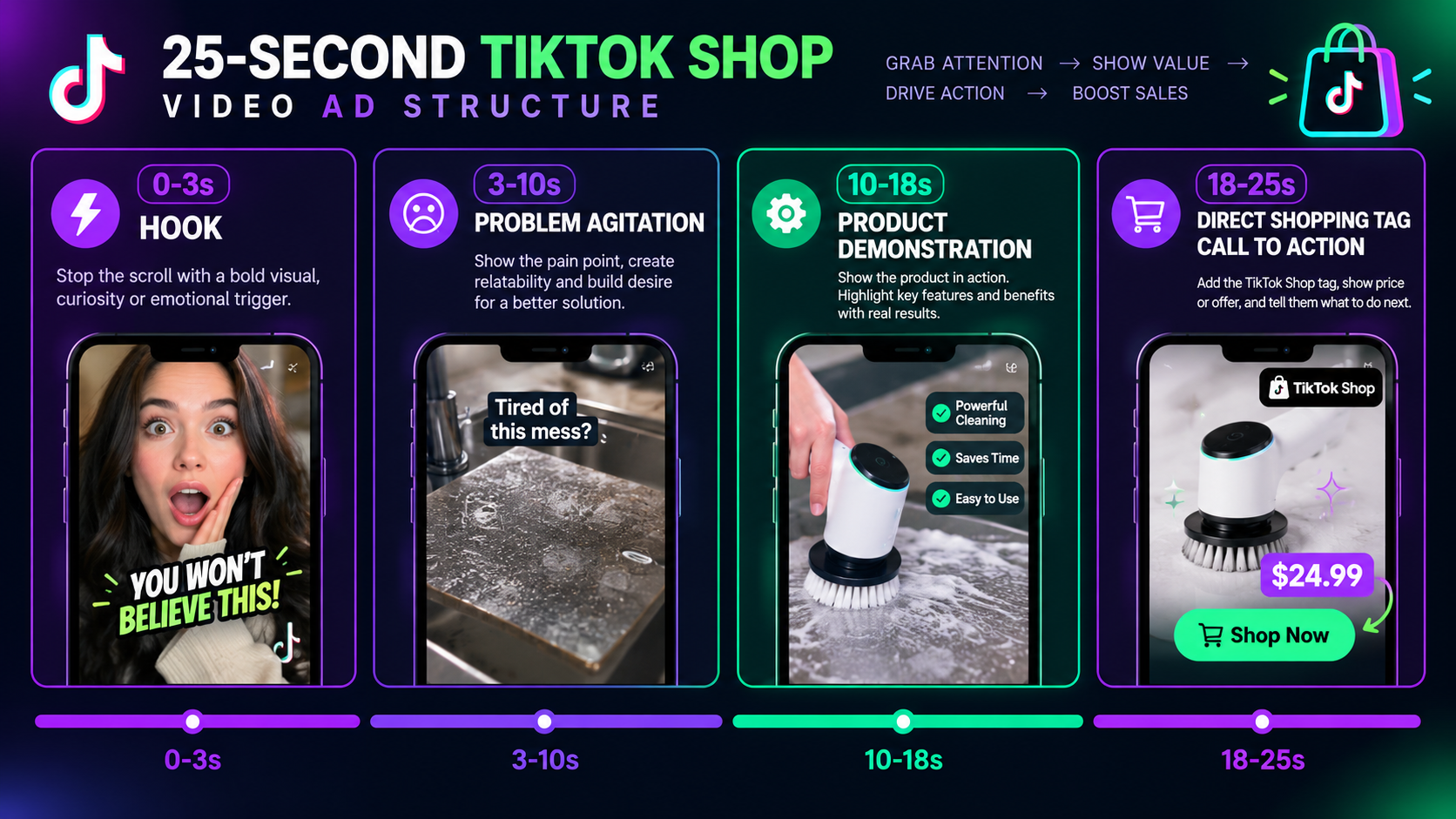
Step 1: Identifying the Viral Hook Angle for Your TikTok Shop Product#
The foundation of understanding how to create tiktok shop video ads lies in isolating the exact emotional trigger that forces someone to stop scrolling. You are not selling product specifications; you are selling the relief, confidence, or satisfaction that follows using the product.
In our performance testing across hundreds of viral e-commerce campaigns, three hook frameworks consistently generate the highest click-through rates (CTR) on TikTok Shop product tags:
The 'TikTok Made Me Buy It' Skepticism Hook: 'I kept seeing this viral kitchen gadget all over my feed, and I was 100% convinced it was a scam until it arrived yesterday...' This validates the viewer's natural suspicion while framing the video as an objective test.
The Price-to-Value Disruption Hook: 'Stop paying $80 at Sephora when this exact formula has been sitting on TikTok Shop for under $15...' Direct price anchoring triggers an immediate sense of urgency.
The Visual Problem Demonstration: Open with an extreme close-up of a messy stain, tangled cable, or ruined sneaker, instantly solved in 2 seconds by your product.
For creators seeking high-retention narrative ideas, exploring our breakdown of AI video marketing strategy provides actionable formulas for capturing organic social attention.
Step 2: Scripting the Direct-Response Ad with AI#
A high-converting TikTok Shop script must stay under 45 seconds—ideally between 20 and 32 seconds. If your ad runs too long, viewer retention drops before they ever reach the call-to-action.
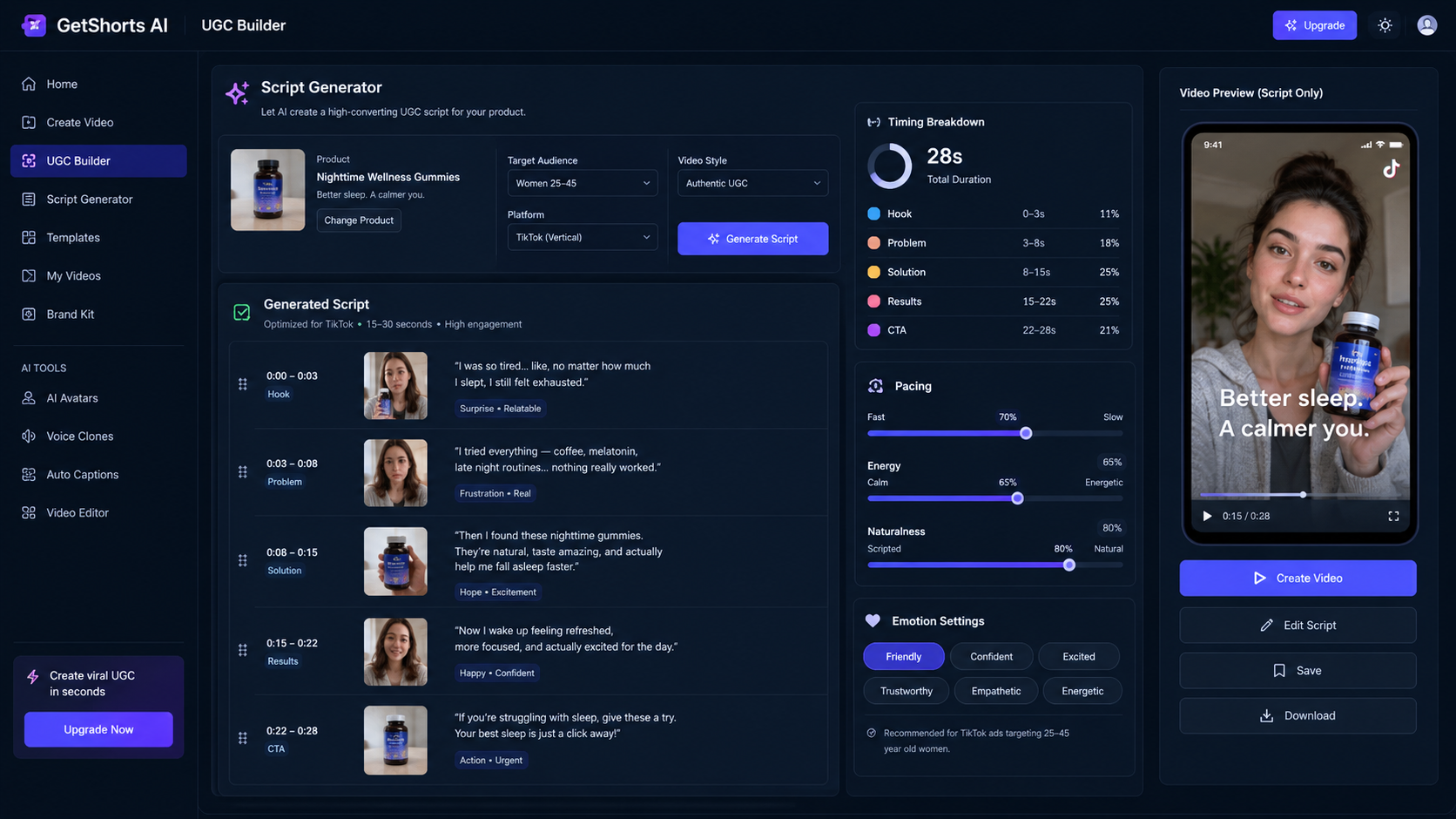
You can use GetShorts' built-in UGC Auto Mode or ChatGPT to draft punchy copy by supplying three inputs: your product URL, the target customer's main frustration, and the specific discount or bundle offer available on TikTok Shop. Structure your prompt around the PAS (Problem-Agitate-Solve) direct-response formula:
'Write a 25-second conversational TikTok Shop script for [Product]. Voice should sound like an excited 24-year-old creator speaking candidly to their front-facing camera. Structure: 3s curiosity hook about why everyone is buying this on TikTok Shop, 10s authentic problem/solution demo, 7s social proof, and a 5s CTA telling viewers to tap the orange cart below before stock runs out.'
Notice the deliberate conversational tone. Avoid formal jargon like 'superior quality' or 'game-changing technology.' Real TikTok users say 'I am genuinely obsessed' or 'My jaw literally hit the floor.'
Step 3: Generating Hyper-Realistic AI UGC Avatars and Voices#
Historically, e-commerce founders had to recruit micro-influencers, ship product samples across the country, wait 3 weeks for deliverables, and hope the creator followed instructions. If the lighting was bad or the pacing lagged, you lost your investment.
With modern AI video tooling, you can select diverse, expressive human avatars directly inside GetShorts. Here is how to configure your avatar for maximum authenticity:
Select a Relatable Persona: Choose an avatar that mirrors your exact buyer demographic (e.g., college students for dorm accessories, suburban homeowners for cleaning tools, fitness enthusiasts for supplements).
Pair With Natural Voice Synthesis: GetShorts integrates top-tier ElevenLabs neural voices and the Kokoro engine. Select voice profiles that feature conversational micro-inflections, slight breath pauses, and realistic emotional cadence. You can also explore our standalone free AI text to speech tool to preview voices prior to rendering.
Enable AI Skin Enhancer: Ensure your avatar video looks pristine on high-resolution smartphone screens by toggling the built-in Skin Enhancer, upscaling facial clarity and eliminating artificial compression artifacts.
Step 4: Layering Product B-Roll, Dynamic Captions, and Audio Cues#
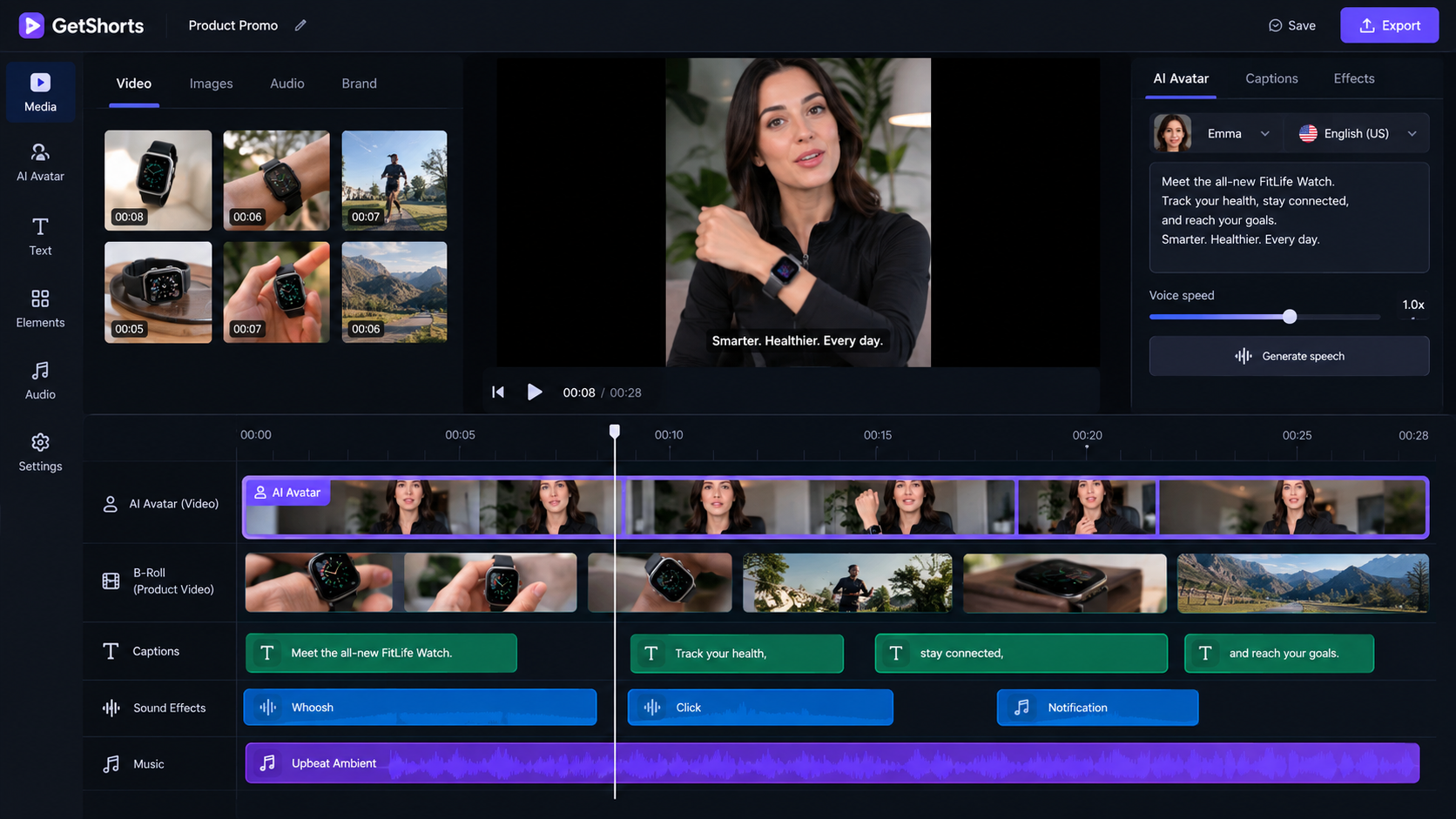
A talking head avatar alone will not carry a viral TikTok Shop ad. TikTok viewers crave visual variety. To keep average watch time above 70%, you must cut away to product action shots every 2 to 3 seconds.
Inside the GetShorts timeline video editor, combine your avatar's A-roll audio track with dynamic cutaways:
1. Drop In Product B-Roll: Upload high-resolution unpackaging clips, macro texture shots, or use GetShorts' AI scene generator to render custom visual B-roll showcasing your product in real-world environments.
2. Apply Dynamic Kinetic Subtitles: Over 60% of TikTok users watch video with audio on, but bold, animated subtitles increase comprehension and reinforce key selling points. Choose high-contrast yellow and white fonts with active word highlighting.
3. Add Trending Sound Design: Layer subtle background audio under your avatar's voiceover. Keep the background music track at 12-15% volume so the narration remains crystal clear.
Step 5: Uploading, Tagging Products, and Scaling Ad Variations#
Once your video is exported from GetShorts in vertical 9:16 format (1080x1920), the final execution phase begins within TikTok Ads Manager or your TikTok Shop Seller Center:
Attach the Product Showcase Link: In the video upload screen, select 'Add Link' and choose 'Product'. Search your synchronized catalog and link the exact item shown in the creative. Verify the price and shipping badge display properly.
Batch Test 5 Creative Variations: Never rely on a single video creative. Because GetShorts enables rapid iteration, produce 5 variations of the same product offer by testing 3 different 3-second hooks paired with 2 distinct avatar personas. For strategies on managing high-volume vertical channels, see our tutorial on how to make faceless videos.
Monitor Cost Per Acquisition (CPA): Allow each creative variation to spend $30-$50. Kill variations with hook rates under 25% or zero checkout clicks, and reallocate budget toward winning creatives that maintain a high return on ad spend (ROAS).
Key Takeaways: Scaling Your E-Commerce Store with AI#
TikTok Shop rewards speed and creative testing velocity. The brands generating hundreds of thousands in monthly sales are not spending weeks debating creative briefs; they are publishing 3 to 5 new video ad iterations daily to pinpoint viral winners.
By mastering how to create tiktok shop video ads using GetShorts, you eliminate creator bottlenecks, drastically reduce cost per creative, and build an automated visual marketing pipeline that drives predictable sales day in and day out. Review our flexible pricing plans to find the tier that matches your production scale, and launch your next high-converting video campaign today.
Stop Booking Overpriced Creators. Start Scaling UGC Ads.
Produce high-quality AI avatars, auto-captions, B-roll composites and translate scripts instantly. Generate 10+ hook variants for testing.
No credit card required • Start free trial instantly